The Coworkies Forum is a community discussion platform where coworkers ask questions, share ideas, make suggestions, and engage with the coworking community. Create threads with Markdown formatting. Categories: General, Suggestions, Questions.
Forum Overview
The Coworkies Forum is a community discussion platform where coworkers can ask questions, share ideas, make suggestions, and engage with the coworking community. The forum supports rich text formatting through Markdown and organizes discussions into categories.
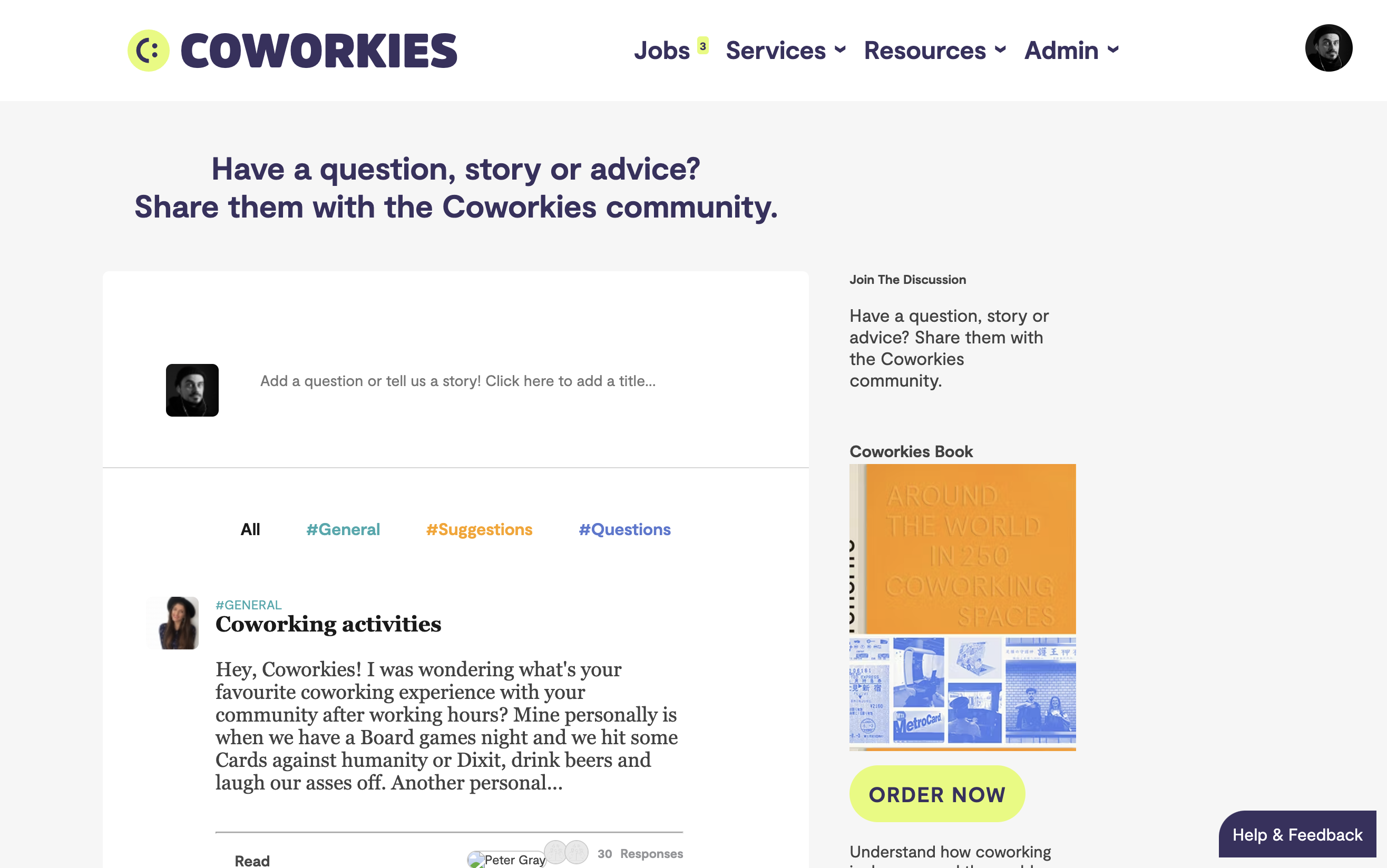
Accessing the Forum
To access the forum:
- Navigate to the main menu
- Click “Forum”
- Browse or search for discussions
Forum Categories
The forum is organized into three main categories:
General
- Purpose - General discussions about coworking, work, and community
- Use For - Broad topics, casual conversations, general questions
- Examples - “Best practices for remote work”, “Coworking trends”
Suggestions
- Purpose - Ideas and suggestions for improving Coworkies or coworking
- Use For - Feature requests, platform improvements, community ideas
- Examples - “New feature suggestion”, “Platform improvement idea”
Questions
- Purpose - Specific questions that need answers
- Use For - How-to questions, troubleshooting, seeking advice
- Examples - “How do I…?”, “What is the best way to…?”
Creating a Thread
Starting a New Discussion
- Navigate to the Forum
- Click “New Thread” or “Create Thread”
- Select a category (General, Suggestion, or Question)
- Enter a thread title
- Write your post content
- Publish your thread
Thread Title Best Practices
- Be Clear - Use descriptive titles that explain the topic
- Be Specific - Avoid vague titles like “Help” or “Question”
- Include Context - Add relevant details in the title
- Examples:
- Good: “How to optimize job postings for better visibility?”
- Bad: “Help with jobs”
Thread Content
When writing your thread:
- Provide Context - Explain the situation or question clearly
- Be Respectful - Maintain a professional and friendly tone
- Use Formatting - Use Markdown to make your post readable
- Add Details - Include relevant information to help others understand
Replying to Threads
Adding a Reply
- Open the thread you want to reply to
- Scroll to the reply section
- Write your response
- Use Markdown formatting if needed
- Submit your reply
Reply Best Practices
- Be Helpful - Provide useful information or constructive feedback
- Stay On Topic - Keep replies relevant to the thread
- Be Respectful - Maintain a positive and professional tone
- Add Value - Contribute meaningful insights or answers
Nested Replies
Some threads support nested replies (replies to replies):
- Click “Reply” on a specific post
- Your reply will be nested under that post
- This helps organize longer discussions
Markdown Formatting
Forum posts support Markdown for rich text formatting. Here’s how to use it:
Links
Links are automatically converted when you paste them, or you can use Markdown syntax:
Automatic: Just paste the URL: https://www.coworkies.com
Markdown: [Link text](https://www.coworkies.com)
Images
To add an image, use the following syntax:

Example: 
Important: Don’t forget the ! in front of the first bracket!
Text Formatting
Headers
Use # for headers (more # = smaller header):
# H1 - Main Header
## H2 - Subheader
### H3 - Smaller Subheader
#### H4
##### H5
###### H6
Emphasis
Bold text:
- Write:
**bold text**or__bold text__ - Result: bold text
Italic text:
- Write:
*italic text*or_italic text_ - Result: italic text
Bold and italic:
- Write:
***bold and italic*** - Result: bold and italic
Strikethrough
- Write:
~~strikethrough text~~ - Result:
strikethrough text
Lists
Unordered lists:
- Item 1
- Item 2
- Item 3
Ordered lists:
1. First item
2. Second item
3. Third item
Code
Inline code: `code`
Code blocks:
Your code here
Thread Features
Pinned Threads
Important threads may be pinned to the top:
- Pinned threads appear first in the list
- They’re marked with a pin icon
- Used for announcements or important discussions
Thread Statistics
Each thread shows:
- Replies Count - Number of replies
- Latest Repliers - Profile photos of recent participants
- Author - Who created the thread
- Date - When the thread was created
Thread Navigation
- Browse All - View all threads
- Filter by Category - View threads in specific categories
- Search - Search for specific topics
- Pagination - Navigate through multiple pages of threads
Community Guidelines
Be Respectful
- Treat others with kindness and respect
- Avoid personal attacks or harassment
- Maintain a professional tone
- Disagree constructively
Stay On Topic
- Keep discussions relevant to the thread
- Create new threads for new topics
- Don’t hijack threads with unrelated content
Provide Value
- Share useful information
- Answer questions when you can
- Contribute meaningful insights
- Help build a helpful community
No Spam
- Don’t post promotional content without context
- Avoid repetitive posts
- Don’t post the same content multiple times
- Respect the community’s time
Best Practices
Creating Effective Threads
- Choose the Right Category - Post in the most relevant category
- Clear Titles - Use descriptive, specific titles
- Provide Context - Give enough information for others to help
- Use Formatting - Make your post readable with Markdown
- Be Patient - Wait for responses before bumping threads
Engaging in Discussions
- Read First - Read existing replies before posting
- Add Value - Contribute something meaningful
- Be Helpful - Answer questions when you can
- Stay Active - Engage with the community regularly
- Follow Up - Respond to replies on your threads
Troubleshooting
Cannot Create Thread
If you can’t create a thread:
- Verify you’re logged in
- Check that your account is validated
- Try refreshing the page
- Contact support if issues persist
Formatting Not Working
If Markdown isn’t working:
- Check your syntax carefully
- Verify you’re using correct Markdown syntax
- Try previewing your post first
- Review the formatting guide above
Thread Not Appearing
If your thread doesn’t appear:
- Check that it was published successfully
- Verify you’re viewing the correct category
- Refresh the page
- Check if it needs moderation approval