Coworkies uses Stripe for all payments, accepting major credit cards. After each purchase, you receive an email with your receipt and invoice. You can view your billing history and download invoices at any time from your account settings.
Who needs billing?
Billing applies to:
- Pro space plan subscribers
- Users who purchased a paid job ad promotion
Free features (posting free jobs, member profiles, space directory listings) do not involve billing.
How to access billing
- Log in to your Coworkies account.
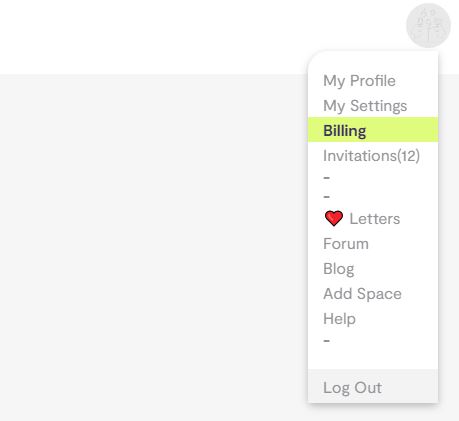
- Click your profile picture in the top menu to open the dropdown.
- Select “Billing” from the dropdown menu.
How to view invoices
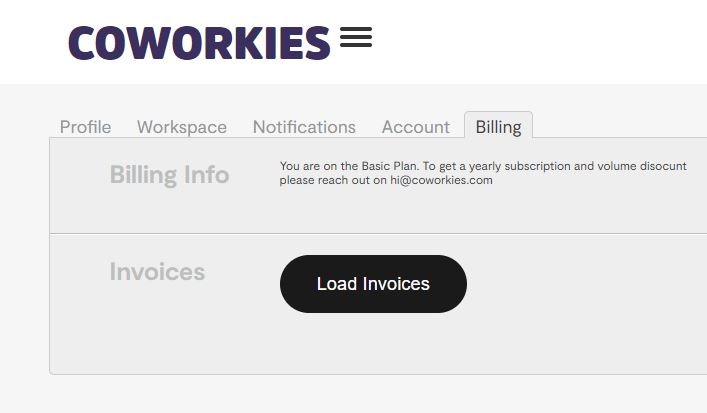
On your Account Settings page, click “Billing” or click the “Load Invoices” button. This displays all invoices linked to your account.
Payment details
- Payment processor: Stripe (secure, PCI-compliant)
- Accepted methods: All major credit cards
- Invoice delivery: Sent by email after each purchase
- Company details: Add your company name, address, and tax number on the Stripe checkout page for accurate invoices
Need help?
For billing questions, contact us:
- Via our Contact Form
- Directly on LinkedIn: Pauline Roussel
Related docs
- Pro Spaces – Pro plan features and pricing
- Job Promotions – Paid job ad options
- Space Plans & Upgrades – Compare Free and Pro plans